


Local Matters: Where You Live
4.943.00 Reviews
App Specs
- Version
- 1.9.4
- Updated On
- License
- Free
- Downloads
- 10,000+
- Developer
- LifeAgents
- Categories
- News & Magazines
- Platform
- Android
Screenshots
 Analysis by AppCompare
I tend to judge a local-information app by what it helps me do when I’m already busy: decide whether to leave now, find something nearby, or avoid a wasted trip. Local Matters: Where You Live is built around that everyday need, bringing neighborhood information into one place rather than making me jump between separate news, weather, and discovery tools. I’d treat it as a useful starting point for getting a feel for what’s happening around home, not as a replacement for every source I rely on.
A quick check before heading out
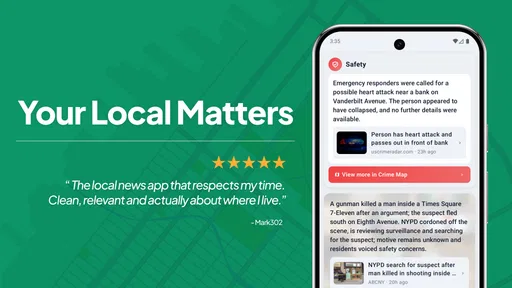
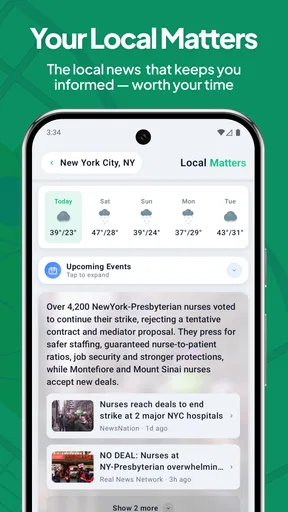
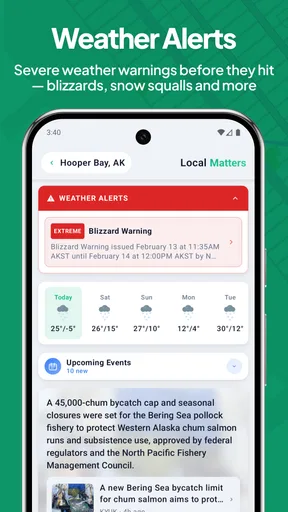
The app’s focus on safety alerts, nearby news, and weather makes it most appealing when those details affect a real decision. Before walking the dog, for example, I might want a quick sense of local conditions and anything important happening close by. Before setting off across town, I’d check whether a neighborhood update changes my plans. The value is in having local context to hand, rather than needing to remember which separate app might cover each question.
That convenience has a practical limit: local information is only useful when it is relevant to the place and topics I care about. Personalization can help keep a feed from feeling like a broad bulletin board, but I would still check important alerts against an authoritative source when a decision has safety consequences. For routine planning, the app can be a handy first look; for urgent instructions, I would not rely on a single news app alone.
Where it fits in a busy day
A realistic routine might be to glance at the app over breakfast, notice a local update that affects the school run, and then check the weather before choosing whether to walk or drive. Later, a nearby story might give me a reason to explore a part of town I usually pass through. That is a more grounded use than opening it repeatedly in search of constant entertainment: it helps connect small decisions to what is happening around me.
I’d also use it differently depending on how long I have. With a minute to spare, I’d scan for the most relevant local information and move on. If I had time to explore, I could follow a neighborhood story or compare what is happening in nearby areas. The useful habit is to check with a purpose, so notifications and headlines support the day instead of becoming another stream demanding attention.
Choosing it over separate apps
Many people already use a weather app, a local newspaper, community social feeds, and map tools. Those alternatives can be stronger when I need a specialist feature: a detailed forecast, a reporter’s deeper coverage, or a map built around directions. The appeal here is the possibility of seeing local concerns together. I’d keep my established specialist apps for tasks where depth matters, while using this one to get a broader neighborhood overview.
That distinction also helps set expectations. A community feed can surface personal recommendations and conversations, while a news source may offer more reporting and context. A local information app is most useful when I want a convenient overview without treating every post or alert as equally important. I’d judge its value by whether the items it brings forward save me time or help me make a better everyday choice.
Worth Reading Before You Choose

EA SPORTS FC Mobile 26 Is a Bigger Football Game, but It Takes Time

Flipboard Shows What News Apps Must Do Beyond the Feed

Switching to Android Auto Means Rethinking Your Driving Routine

Google Calendar Makes a Crowded Week Easier to Manage

Ludo King Makes the Most of the Minutes Between Plans

Baby Panda World Brings Quick Play to Modern Phones, but Its Game Library Feels Busy
Who is likely to get the most from it?
I can see it suiting someone who has recently moved, is trying to understand the rhythm of a new area, or wants a simple way to keep up with nearby developments. It may also work for people who have lived in the same place for years but rarely look beyond their usual routes. If I mainly want national headlines, a specialized news reader is a better fit. If I need turn-by-turn navigation or highly detailed weather tools, I’d reach for an app designed specifically for those jobs.
It is also worth thinking about how much local information I actually want in a day. Someone who dislikes alerts may prefer to check manually and keep interruptions low. Someone who wants every community conversation may find a dedicated neighborhood network more active. The best fit is a person who values a focused local snapshot and is comfortable using other sources when a question needs more depth.
Discovering the Local Scene
Local Matters: Where You Live is all about connecting you with the best local spots. The app uses your location to suggest places like cafes, parks, events, and even hidden shopping spots. I found it pretty cool how it sorts these places based on your interests. You just plug in what you're into, and boom, a list of places you never knew existed pops up.
One of the neat features is the ability to create custom lists. I put together a list of "Must-Try Coffee Shops" because, let's be real, who doesn't love a good coffee hunt? And the app didn’t disappoint. I found a cozy little spot I would've never stumbled upon otherwise.
Small checks that make discovery more useful
When I’m exploring recommendations, I’d use a saved list as a lightweight plan rather than treating it like a ranking I have to follow. A short list for a particular neighborhood can make a free afternoon easier to organize: I can pick one place as the main stop and keep the others as flexible options. That also makes recommendations more useful later, when I’m already nearby and want a quick idea rather than a long search.
I’d be selective about what I save. A list that mixes every passing idea quickly becomes another cluttered inbox, while separate lists for different moods or areas are easier to act on. Before making a special trip, I’d still check the place’s current details elsewhere if timing matters. Discovery is a good prompt to explore, but a recommendation alone is not a guarantee that a venue suits today’s plans.
User-Friendly Interface
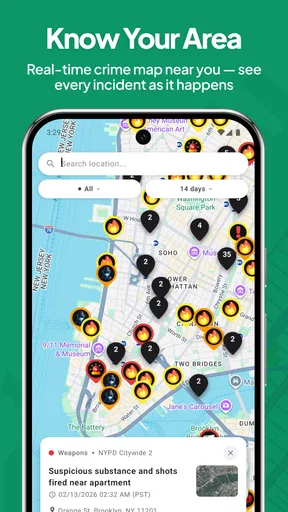
The interface is super intuitive. Even if you aren't the most tech-savvy person, navigating through the app feels like a breeze. Everything is laid out in a simple, straightforward manner. The home screen greets you with a map view, showcasing all the points of interest around you. You can switch to a list view if maps aren’t your thing.
What I found really helpful were the user reviews and ratings. They give you a real feel of what to expect before you head out. I've avoided a couple of duds thanks to this feature, and it's always good to see what fellow locals think about a place.
Keeping expectations grounded
For me, a map is best for understanding where things sit in relation to one another; a list is better when I’m comparing several options quickly. Switching between those ways of browsing can make a casual search less fiddly, especially if I already know the part of town I want to visit. Reviews add another perspective, but I’d read them as individual experiences rather than a promise that my own visit will be identical.
Local listings also depend on having useful information for the area I’m in. In a place with plenty of active local coverage, discovery can feel more rewarding; in a quieter area, I’d be realistic about how much variety appears. If a search comes up thin, that does not automatically make the app useless: it may still help with the information it does surface, while a broader map or search service can fill gaps for a specific outing.
Stay Updated with Local Events
One of the highlights of Local Matters: Where You Live is its event section. It's like having a personal local events calendar in your pocket. From art shows to food festivals, there’s always something happening. The app even sends out notifications for upcoming events that match your interests, so you’ll never miss out.
I remember seeing a notification about a street food festival just down the road from me. I wouldn’t have known about it otherwise, and it turned out to be a fantastic evening filled with delicious eats and live music. This feature definitely keeps things lively and fun!
Alerts without letting them take over
Notifications are useful when they bring a time-sensitive local event to my attention, but they can also interrupt a day if every update feels equally urgent. I’d start by deciding whether I want the app to prompt me or whether I prefer to open it on my own schedule. A notification is an invitation to look, not an obligation to change plans. That small distinction keeps local updates helpful rather than noisy.
For an event I’m considering, I’d use the alert as a discovery cue and then verify practical details before leaving, particularly if I’m coordinating with someone else. That workflow is worth keeping in mind: the app can help me hear about something nearby, while a direct event source is still the sensible place to confirm any last-minute arrangements. It gives the event feature a clear role without asking it to do every job.
Supporting Local Businesses
A big plus for me is how this app shines a spotlight on local businesses. In a world where big chains dominate, it's refreshing to see an app dedicated to promoting mom-and-pop shops. There’s a sense of community as you explore and support these businesses. Plus, many of them offer exclusive deals through the app, so you can save a few bucks while shopping local.
Every time I use the app, I feel like I'm part of something bigger, contributing to the local economy and discovering places that may not have the marketing budget to reach a broader audience.
Performance and everyday reliability
Because its purpose involves checking what is relevant nearby, the experience matters most when I want a quick answer rather than a long browsing session. I’d expect the value to come from opening it, finding the local item I need, and getting on with the day. I can’t responsibly promise a particular loading speed or battery impact, so I’d judge those in normal use on my own phone instead of assuming that a local feed is automatically light or instant.
For reliability, I’d distinguish between the app being available and every local item being complete or current. A news update, safety notice, or event detail can change, so I’d confirm important information when it affects a route, meeting, or safety decision. If the app feels slow or stops refreshing, I’d first check whether my connection is working, reopen it, and consult another source for anything urgent rather than treating a stale screen as a live update.
The developer is LifeAgents, and the app is free in the news and magazines category. It has an average rating of 4.8 from around 230 ratings, with over 10,000 installs. It is rated for everyone, its current version is 1.9.4, and it runs on Android 8.0 or later. Those basics make it approachable for many Android users, though the age rating should not be mistaken for a guarantee that every local story will suit every reader.
Device fit and practical limits
On an older or storage-constrained phone, I’d be cautious about assuming that any app with maps, images, and frequent updates will feel identical to a lightweight text reader. I’d try the core tasks first: open the local overview, switch between the map and list, and see whether the experience remains comfortable on my device. If I use it only occasionally, checking manually may be a better fit than allowing a steady flow of alerts.
The Android requirement is version 8.0 or later, so a device below that threshold is not a suitable match. For supported phones, the sensible question is less about chasing maximum specifications and more about whether local coverage is useful where I live. When the area has little relevant activity, a general weather tool or established local newsroom may deliver more value for that particular need.
Final Thoughts
All in all, Local Matters: Where You Live is a fantastic app for anyone looking to enhance their local experience. It’s got a great blend of discovery, convenience, and community support. Whether you’re looking to find a new hangout spot or stay in the loop with local happenings, this app has it all.
So, if you're ready to dive deeper into your neighborhood and uncover all the hidden treasures it has to offer, give this app a try. Happy exploring!
My bottom line
I’d recommend giving it a try if you want a neighborhood-oriented companion for casual discovery and local awareness, especially if you’re settling into a new area or trying to make your routines less predictable. I would not make it my only source for breaking safety information, detailed forecasts, or in-depth reporting; specialist tools still have a clear advantage for those needs. The strongest reason to keep it is simple: when it helps me notice something nearby that I would otherwise miss, it earns a place in my daily check-in.
Pros
- User-friendly interface makes navigation easy.
- Provides real-time local news updates.
- Customizable alerts for specific interests.
- Includes community event listings.
- Supports multiple local sources for variety.
Cons
- Limited coverage in rural areas.
- App may slow down older devices.
- Frequent ads interrupt user experience.
- Occasional glitches in notification system.
- Requires constant internet connection.
FAQs for Local Matters: Where You Live
What is Local Matters: Where You Live and how does it work?
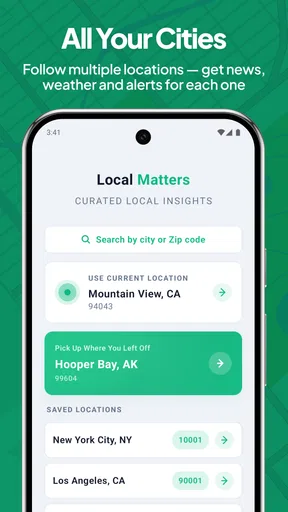
Local Matters: Where You Live is an app designed to connect users with their local community. It provides information on local events, businesses, and services. The app uses your location to deliver personalized content, ensuring you never miss out on what's happening nearby. It’s a great tool for staying informed and engaged with your community.
Is Local Matters available for both Android and iOS devices?
Yes, Local Matters: Where You Live is available for download on both Android and iOS platforms. You can find it in the Google Play Store and the Apple App Store. Ensure your device meets the minimum system requirements for a smooth experience and full access to all features offered by the app.
Does Local Matters require an internet connection to function?
Yes, Local Matters requires an internet connection to provide real-time updates and accurate location-based information. While some features may be accessible offline, such as saved content, most functionalities depend on an active internet connection to deliver the latest community news and events.
Is user data secure with Local Matters?
The app takes user privacy and data security seriously. It employs encryption and other security measures to protect user information. However, as with any app that uses location services, it’s important to review the privacy policy and settings to ensure you are comfortable with how your data is used and shared.
Are there any costs associated with using Local Matters?
Local Matters is free to download and use, offering a range of features at no cost. However, it may offer in-app purchases or a subscription model for premium features. It’s advisable to check the app’s description in the store for any potential costs before downloading to avoid unexpected charges.


